
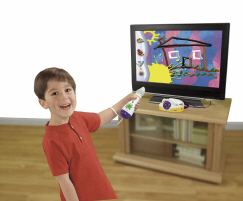
Splatster
Product Desciption:
Instruction Sheets
Click on a link below to view the Adobe PDF Format Instruction Sheet. To ensure proper operation, please download ALL instruction sheets for your product.
Frequently Asked Questions
-
I am receiving a cannot save picture error message on my TV Screen while trying to save pictures from my Splatster™, what does this mean?
There are five different reasons this message may appear. Find the correct message below:
There is no USB Drive Inserted.
- No USB drive is inserted.
- The USB drive is not seated properly.
The USB Drive is full.
- There is not enough space on the USB to save the picture.
USB Removed While Saving.
- USB drive is removed during the save process. The drive can be re-inserted and save should continue.
USB Error.
- You have plugged in a USB device that is not a drive (i.e., mouse).
- Your drive is formatted incorrectly.
- Your USB does not fit in slot.
Battery too Low to Save.
- The batteries need to be replaced in the base unit.
-
What are the best kind of batteries to use in Fisher-Price® and Mattel® products?
A. We recommend using alkaline batteries with our products, as they are great for long-term use and help optimize performance. We don't recommend using Carbon-Zinc batteries. While Carbon-Zinc batteries may work well with low-power devices, they can drain after a short period of time and cause certain products to not function properly.
-
I am receiving a cannot save picture error message on my TV Screen while trying to save pictures from my Splatster™, what does this mean?
There are five different reasons this message may appear. Find the correct message below:
There is no USB Drive Inserted.
- No USB drive is inserted.
- The USB drive is not seated properly.
The USB Drive is full.
- There is not enough space on the USB to save the picture.
USB Removed While Saving.
- USB drive is removed during the save process. The drive can be re-inserted and save should continue.
USB Error.
- You have plugged in a USB device that is not a drive (i.e., mouse).
- Your drive is formatted incorrectly.
- Your USB does not fit in slot.
Battery too Low to Save.
- The batteries need to be replaced in the base unit.
Purchase Parts
Sorry, replacement parts are not currently available for this product